BAIGONEX POS · EARLY ACCESS
At the counter. In the same business picture.
Bring in-store sales, cashiers and stock into your connected company workflow.
In Early Access · Register interest; availability is confirmed during onboarding.
INSIDE POS
Explore what POS can bring to your team.
Retail shops, counter sales teams and businesses with physical locations.
01 / COUNTER SALES
Keep the checkout focused on the customer.
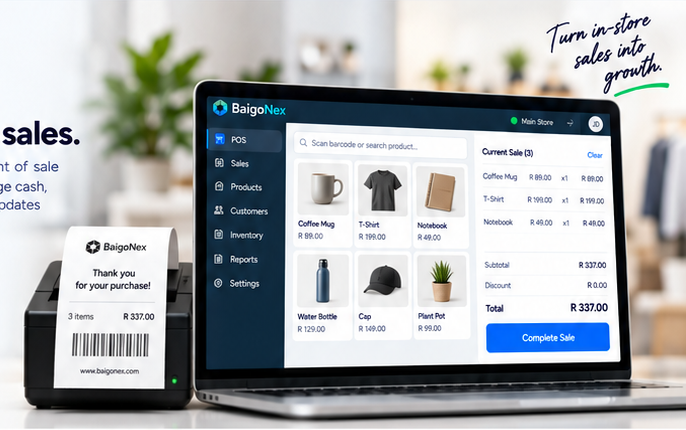
A counter sale brings products, quantities and payment review together in a focused workspace. Cashiers use the company catalogue instead of maintaining a separate list of store products.
- Find items in the shared company catalogue.
- Review quantities and the basket before completing a sale.
- Keep the cashier and store context with the transaction.
- Confirm supported payment and receipt workflows during onboarding.
View full-size illustration02 / CASHIER & SHIFT REVIEW
Give each shift a clear beginning and end.
Shift context helps the team understand who handled a sale and which activity still needs review. Cashiers stay focused on serving customers while managers review the operational picture.
- Align access with cashier and manager responsibilities.
- Keep sales grouped with the relevant shift.
- Review recorded payment activity and exceptions.
- Use an end-of-shift handover to identify unresolved work.
WORKFLOW EXAMPLE
A cashier shift
- Stage
- Open
- Cashier workflow
- Start assigned shift
- Manager review
- Store and cashier context
- Stage
- Serve
- Cashier workflow
- Review and complete sales
- Manager review
- Transaction references
- Stage
- Close
- Cashier workflow
- Hand over shift activity
- Manager review
- Payments and exceptions
03 / STOCK & OPERATIONS
Connect the counter to the company behind it.
In-store sales affect the wider business. Shared item identity and stock context help operations understand counter activity alongside the other sales channels used by the company.
- Use consistent item references across selling channels.
- Review inventory information in the correct store context.
- Connect completed sales to operational review.
- Confirm supported hardware and stock policies before launch.
WORKFLOW EXAMPLE
The same item across the business
- Workspace
- POS
- Shared context
- Item and store
- Purpose
- Counter sale
- Workspace
- Inventory
- Shared context
- Item and location
- Purpose
- Stock review
- Workspace
- Accounting
- Shared context
- Sale reference
- Purpose
- Financial review
HOW IT WORKS
Every step keeps its company context.
An overview of the intended workflow. Enabled features and setup are confirmed during Early Access onboarding.
- 01
Find the item
- 02
Complete the sale
- 03
Review the shift
- 04
Connect to operations
PART OF SOMETHING CONNECTED
Your company stays the same.
This app is part of BaigoNex. ONE TRUTH means one business entity, one canonical identity, shared across apps. Company permissions govern which records each team can use.
BEFORE YOU JOIN
Questions about POS.
Which hardware is supported?
Device, printer, scanner and payment compatibility are confirmed during Early Access onboarding. The page illustrations are not a hardware compatibility list.
Does POS use a separate catalogue?
The platform direction is one company item identity shared with other apps, with the store and cashier context kept clear.
Can I start using it immediately?
Register for the Early Access programme. The team will confirm release availability and setup requirements before enabling your company.
BE PART OF WHAT'S NEXT
Explore POS with us.
We are in Early Access. Register your interest, share your business needs and choose how you want to hear from us. Registration does not create an account or subscription.